NVR vs DVR
For a new install, an NVR is the modern default: it takes IP cameras over a single Ethernet cable that also carries power under IEEE 802.3, so there is no separate power run to fit. A DVR only makes sense when a property already has analogue coax wiring in place from a previous system, since it reuses that coax rather than requiring cameras to be rewired.
NVR stands for network video recorder and DVR for digital video recorder, and the difference is not really about the recorder box, it is about what kind of camera and cable each one expects. An NVR expects an IP camera talking over Ethernet, and when that Ethernet also carries PoE power, one cable per camera is the entire installation. A DVR expects an analogue camera sending video down a coax cable, and because coax carries no meaningful power, every analogue camera also needs its own separate power cable or a shared power supply box.
This is why NVR has effectively become the default choice for any new system: it is one cable instead of two per camera, higher resolution ceilings, and camera counts that scale with network ports rather than with a fixed set of coax inputs. DVR still has one legitimate advantage, and it is a real one for a specific situation.
| Factor | NVR (IP cameras) | DVR (analogue cameras) |
|---|---|---|
| Cable per camera | One Ethernet cable, power and video | Coax plus a separate power cable |
| Typical resolution ceiling | 8MP to 12MP and higher | Generally lower than IP options |
| Powering the camera | PoE over the same cable, up to 71.3 W | Separate power supply or injector |
| Expansion | Add a cable and use a spare port | Limited by fixed coax inputs |
| Best for | Any new install | Reusing existing coax wiring |
What does an NVR actually need from each camera?
A single Ethernet cable per camera, run back to the recorder or to a PoE switch feeding the recorder. That cable carries the video data digitally, with no analogue signal loss over distance, and under IEEE 802.3af it also carries up to 12.95 W to run the camera itself, so no second cable for power is needed at all. The 100 metre ANSI/TIA-568 channel limit on that Ethernet run is the only real distance constraint, and a PoE extender can push past it if a run genuinely needs to go further.
What does a DVR actually need from each camera?
A coax cable carrying an analogue video signal, plus a separate low voltage power cable to every single camera, since coax does not carry power the way PoE Ethernet does. Some systems bundle both into a combined cable called Siamese cable, which helps, but it is still functionally two connections doing two jobs rather than PoE's one cable doing both.
When does a DVR actually make sense?
When a property already has coax wiring in the walls from a previous analogue system, or from an old cable television installation being repurposed. Reusing that existing coax with a DVR and new analogue cameras can be genuinely cheaper and faster than pulling all new Ethernet, and it is the one scenario where recommending a DVR over an NVR is honest rather than nostalgic.
- Existing coax runs from a prior CCTV system
- Repurposed cable television wiring already in the walls
- A budget that cannot absorb a full re-cable
Does resolution differ between the two?
Meaningfully, at the high end. Modern NVRs commonly run cameras up to 8MP or 12MP, well past 4K, because IP cameras encode digitally with no analogue bandwidth ceiling. DVRs and their matching analogue cameras have improved a great deal over the years, with some HD analogue formats reaching 5MP, but the ceiling still tends to sit lower than the IP camera options an NVR can use, and the highest resolution cameras in any catalog are typically PoE, not analogue.
Is an NVR harder to expand later?
The opposite, usually. Adding a camera to an NVR system means running one more Ethernet cable and plugging it into a spare PoE port, and many NVRs have spare channels built in from the start specifically for this. Adding a camera to a DVR system means running both a coax cable and a separate power cable to the new position, and coax input counts on a DVR are fixed by the hardware rather than by available network ports.
The verdict
Choose an NVR for any new install without hesitation: one cable per camera, higher resolution ceilings, and simpler expansion. Choose a DVR only if a property already has usable analogue coax wiring in place, in which case reusing it is a legitimate cost saving rather than a downgrade, and treat it as a bridge to eventually replacing with an NVR system when that wiring needs replacing anyway.
The gear that matches this answer

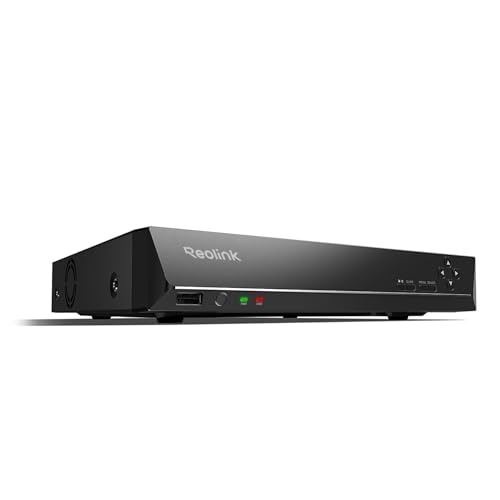
REOLINK RLN8-410 8CH NVR Network Video Recorder PoE
$349.99Eight PoE ports built into the recorder, so the cameras get power and data from the same box and there is no separate switch to budget.
- Channels
- 8
- PoE ports
- 8
Prices change often.
REOLINK RLN16-410 16CH NVR Network Video Recorder PoE
$459.99Sixteen channels for a property that has outgrown eight, and the usual reason to buy one is a detached garage or a second building.
- Channels
- 16
Prices change often.

ANNKE 12MP 8CH PoE Network Video Recorder, No HDD
$159.99Supplied without a drive, which is the cheaper path when you are fitting a surveillance drive sized from your own retention calculation rather than accepting whatever came in the box.
- Channels
- 8
- Resolution
- 12 MP
- PoE ports
- 8
Check first:No hard drive is included. Budget for a surveillance rated drive separately.
Check price on AmazonPrices change often.

TRENDnet 8-Channel UHD PoE NVR, TV-NVR1508
$107.99TRENDnet is a networking company rather than a camera company, and this recorder takes standards compliant cameras rather than locking to one brand.
- Channels
- 8
- PoE ports
- 8
Prices change often.

REOLINK 8CH 4K Security Camera System with 2TB HDD RLK8-800B6
$755.99Six 4K bullet cameras on an eight channel PoE recorder with a 2TB drive already fitted, which is the configuration most three bedroom homes land on after doing the entry point count.
- Channels
- 8
- Cameras included
- 6
- Resolution
- 8 MP
- Drive included
- 2 TB
Prices change often.
Common questions
Can I connect an IP camera to a DVR, or an analogue camera to an NVR?
Not directly, in most cases. A DVR expects an analogue coax video signal and cannot decode an IP camera's digital stream, and an NVR expects a network connection an analogue camera does not produce. Some hybrid recorders exist that accept both, but a straight NVR or DVR is built around one camera type only.
Is PoE only available on NVR systems?
Effectively yes for cameras, since PoE is an Ethernet standard and analogue coax cameras have no equivalent way to receive power over their video cable. Some DVR systems power cameras from a shared power supply box near the recorder instead, which reduces the number of separate power adapters but still requires a dedicated power cable run to each camera.
Does an NVR need an internet connection to work?
No. An NVR records locally to its own drive over the local network regardless of internet access, and only needs an internet connection for remote viewing from outside the property or for firmware updates. The same is true of a DVR: local recording keeps working through an internet outage on both recorder types.
Why do some installers still push DVR systems?
Usually cost, on a property that already has coax wiring installed. Reusing existing coax avoids the labor of running new Ethernet to every camera position, which can make a DVR genuinely cheaper for that one property, even though a fresh install with no existing wiring is almost always better served by an NVR.
Can I upgrade a DVR system to an NVR later without rewiring?
Not usually. NVR cameras need Ethernet, and DVR cameras need coax plus separate power, so switching recorder types generally means running new cable to every camera position. The practical path is to plan the upgrade for whenever that coax wiring would need replacing anyway, rather than trying to bridge the two cable types.
Get the system planning sheet
The camera count, storage and PoE budget worksheet, plus the wiring checklist, as one printable page.
Keep going
Before you point a camera at anything. Aim cameras at your own property and your own boundary, never into a neighbour's windows or across their garden. Cameras in bedrooms, bathrooms, or anywhere else a person reasonably expects privacy are a serious legal problem, and that includes guests, lodgers and anyone who works in your home. Audio is legally different from video, many US states require the consent of every party to a recorded conversation, and several recorders capture audio by default, so check your own state before you enable it. Some places require visible notice that recording is taking place, and landlords and homeowner associations often impose their own rules on top. This is researched general information and not legal advice, and the law varies by state and by country.
And once it is installed. Change every default password, keep the firmware updated, and be clear with yourself about where the footage goes: a cloud camera means a third party holds recordings of your home, while a local recorder keeps them in your house. That is a genuine buying consideration, not a technicality.