Keeping a Security Camera Secure
An internet-connected camera with its factory default password is routinely found and logged into by automated scanners, not just by a targeted attacker. Change every default password to a unique one, keep firmware current, turn off UPnP and unused remote access, and put cameras on their own network segment so a compromised camera cannot reach the rest of the house.
A security camera is a small computer on your network with a microphone and a lens, and treating it as "just a camera" is how it becomes the weakest device in the house. Unpatched, internet-exposed cameras running factory default credentials are routinely enumerated by automated scanning tools that specifically look for exactly that combination, and a compromise does not stay contained to the camera unless the network is set up to contain it.
None of this is exotic. It is a short list of habits, most of which take a few minutes per device, and together they close off the overwhelming majority of the ways a consumer camera actually gets compromised.
| Step | Why it matters |
|---|---|
| Change every default password | Default credentials are searchable and actively scanned for |
| Use a unique password per device | Contains a single leaked credential to a single device |
| Keep firmware updated | Patches specific, previously disclosed vulnerabilities |
| Disable UPnP | Stops a router from automatically exposing a camera to the internet |
| Put cameras on their own VLAN | Limits what a compromised camera can reach on the rest of the network |
Why does the default password matter this much?
Every unit of a given camera model ships with the same default username and password, published in its manual and searchable online. Automated scanners work through blocks of internet addresses looking specifically for devices still running those defaults, and a camera left unchanged is not waiting to be targeted by a skilled attacker, it is waiting to be found by a script that already knows the password.
Change the default password on first setup, before the camera is ever connected to the internet if possible, and use a password that is unique to that device rather than one reused from a router or another camera.
Why does each device need its own unique password?
Reusing one password across every camera, the NVR, and the router means a single leaked credential, from any one of those devices or from an unrelated breach of a service that shares the same password, compromises the entire system at once. A unique password per device turns one leak into one problem instead of into every problem.
How often does firmware actually need attention?
Firmware updates from a camera or NVR manufacturer regularly patch specific, previously discovered vulnerabilities, and a device running old firmware is not equally protected against a newly disclosed flaw just because it worked fine yesterday. Check for updates when the system is first installed and periodically afterward, and enable automatic updates if the manufacturer offers them.
What should be turned off rather than left on by default?
UPnP automatically opens ports on a router so a device can be reached from the internet without any manual configuration, which is convenient and also exactly the mechanism that exposes a camera to the open internet without the owner realizing it happened. Disable UPnP on the router and instead use the manufacturer's own cloud relay service or a manually configured, authenticated remote access method if remote viewing is needed.
- Disable UPnP on the router
- Turn off any remote access feature the household does not actually use
- Disable P2P or cloud relay features on cameras that will only ever be viewed locally
What does putting cameras on their own network segment actually accomplish?
A VLAN, or a separate guest-style network, keeps camera traffic on its own segment so that if one camera is compromised, whatever gets in through it cannot freely reach laptops, phones, or file shares on the main household network. This is the single step that limits the damage of every other mistake on this list, and it is the kind of protection that matters precisely because no list of habits is followed perfectly on every device forever.
A switch that supports VLANs, paired with basic configuration in its management interface, is the practical way to do this at home without needing a second physical network.
What is a reasonable baseline for an average home system?
Change every default password to something unique, keep firmware current, disable UPnP and unused remote access, and segment cameras onto their own network if the hardware supports it. None of these steps require specialized expertise, and doing all four is a meaningfully different security posture from doing none of them.
The gear that matches this answer

NETGEAR 8 Port PoE Gigabit Ethernet Easy Smart Managed Switch GS308EP
$79.99Managed, so the cameras can be put on their own VLAN and kept off the rest of the home network, which is the single most effective thing you can do about camera firmware you do not control.
- PoE ports
- 8
- PoE standard
- 802.3af/at
Prices change often.

NETGEAR 16-Port PoE Gigabit Ethernet Unmanaged Network Switch GS316P
$135.75Sixteen ports with a 115 W budget, which suits a mixed system where not every port is a camera.
- PoE ports
- 16
- PoE budget
- 115 W
- PoE standard
- 802.3af/at
Prices change often.

TP-Link TL-SG116P 16 Port Gigabit PoE Switch
$126.38Sixteen PoE ports at a lower price than the equivalent NETGEAR, with a 120 W budget that suits class 2 and class 3 cameras.
- PoE ports
- 16
- PoE budget
- 120 W
- PoE standard
- 802.3af/at
Prices change often.
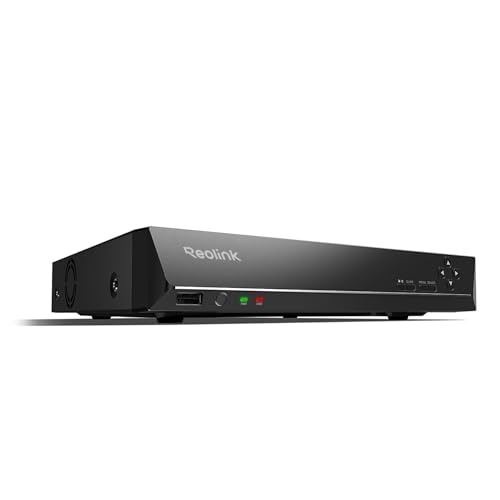
REOLINK RLN16-410 16CH NVR Network Video Recorder PoE
$459.99Sixteen channels for a property that has outgrown eight, and the usual reason to buy one is a detached garage or a second building.
- Channels
- 16
Prices change often.
Common questions
Is it really necessary to change a camera's default password?
Yes. Default usernames and passwords are published in the manual and searchable online, and automated scanning tools specifically look for internet-connected cameras still running them. This is not a targeted attack scenario, it is an automated one, which is why a camera left on its default credentials is found reliably rather than occasionally.
What is a VLAN and do I need special equipment for it?
A VLAN is a way of logically separating devices on the same physical network so traffic from one group cannot freely reach another. You need a switch that supports VLAN configuration, which is common on small business and prosumer PoE switches, and a basic setup in its management interface. The payoff is that a compromised camera is contained to its own segment instead of reaching the rest of the household network.
Should I disable UPnP even if it makes remote viewing harder to set up?
Generally yes. UPnP automatically opens ports on the router so a device can be reached from the internet, which is convenient but also removes visibility into what has been exposed. Most camera manufacturers offer a cloud relay or app-based remote viewing feature that does not require UPnP, and that is the safer way to get the same remote access.
How do I know if my camera's firmware is out of date?
Check the device or NVR's settings menu for a firmware version and compare it against the manufacturer's support page or app, which usually shows the current release. Many systems can also check for updates automatically from within the app. Do this at installation and periodically afterward rather than assuming a system that has always worked is also up to date.
Does a wireless, battery-powered camera need the same security steps as a wired one?
Mostly yes. Default and unique passwords, current firmware, and disabling unused remote access features all apply the same way to a battery camera as to a wired one. VLAN segmentation is harder to apply to a device that connects over Wi-Fi rather than through a managed switch, but a separate guest or IoT Wi-Fi network on the router accomplishes a similar goal.
Get the system planning sheet
The camera count, storage and PoE budget worksheet, plus the wiring checklist, as one printable page.
Keep going
Before you point a camera at anything. Aim cameras at your own property and your own boundary, never into a neighbour's windows or across their garden. Cameras in bedrooms, bathrooms, or anywhere else a person reasonably expects privacy are a serious legal problem, and that includes guests, lodgers and anyone who works in your home. Audio is legally different from video, many US states require the consent of every party to a recorded conversation, and several recorders capture audio by default, so check your own state before you enable it. Some places require visible notice that recording is taking place, and landlords and homeowner associations often impose their own rules on top. This is researched general information and not legal advice, and the law varies by state and by country.
And once it is installed. Change every default password, keep the firmware updated, and be clear with yourself about where the footage goes: a cloud camera means a third party holds recordings of your home, while a local recorder keeps them in your house. That is a genuine buying consideration, not a technicality.
This is researched general information about common security practices for internet-connected cameras, not a guarantee against compromise, and specific risks depend on your own hardware and network. Apply the steps above as a baseline, not a ceiling.