NETGEAR GS308PP PoE Switch Review
The NETGEAR GS308PP is a $69.99 unmanaged 8 port PoE switch with an 83 watt total power budget. Run through the IEEE 802.3af class 3 PSE allocation of 15.4 watts per port, that budget computes to about 4 full class 3 cameras with the standard 20 percent headroom, not the six to eight cameras that a per-port count alone might suggest.
A PoE switch published port count answers the wrong question. Eight PoE ports says nothing about whether the switch can actually power eight cameras at once; the number that matters is the total wattage budget the switch reserves across all its ports, because IEEE 802.3 requires the switch to budget for a camera worst case power class, not its typical draw.
The GS308PP publishes an 83 watt total PoE budget across its eight ports and supports both 802.3af and 802.3at. This review runs that 83 watt figure through the standard IEEE class allocations to find out how many real cameras it actually supports, rather than repeating the port count as if it settled the question.
| Spec | Value |
|---|---|
| PoE ports | 8 |
| Total PoE power budget | 83 W (published) |
| PoE standard | 802.3af / 802.3at |
| Computed class 3 cameras with 20% headroom | About 4 |
| Computed class 3 cameras, raw budget only | About 5, no margin |
| Management | Unmanaged, no VLAN support |
| Price | $69.99 |
The math the port count does not show you
Most fixed PoE bullet and dome cameras, including the REOLINK RLC-810A and RLC-820A reviewed elsewhere on this site, fall into IEEE class 3, which the 802.3af standard requires a switch to budget at 15.4 watts per port regardless of the camera actual typical draw, because the switch cannot know in advance how much power a class 3 device will actually pull.
Four class 3 cameras need 4 times 15.4, or 61.6 watts of switch budget. Adding the standard 20 percent headroom this site applies for a safety margin brings the recommended budget to about 73.9 watts, comfortably inside the GS308PP published 83 watt total. That is the honest number of full-power cameras this switch supports with margin: four.
What happens at five, six and eight cameras
Five class 3 cameras need 77 watts of raw PSE budget, which technically fits inside the 83 watt total with 6 watts, about 7 percent, to spare, but fails the recommended 20 percent headroom this site uses to account for real-world variance, since 77 watts with headroom comes to 92.4 watts.
Six class 3 cameras need 92.4 watts of raw budget, which already exceeds the GS308PP 83 watt total before any headroom is applied at all. Eight class 3 cameras, the classic full population of an 8 port switch, need 123.2 watts, roughly 48 percent more than this switch actually budgets. A switch will not silently under-deliver in that scenario; it will refuse power to, or shut down, whichever ports it cannot cover, which is precisely the mid-winter, heaters-running failure mode a properly sized budget is meant to avoid.
Anyone who genuinely needs six to eight full class 3 cameras on one switch should look at a higher-budget option, such as the 126 watt TP-Link switch in this same catalog, which computes to just over 2 percent spare raw capacity for eight full class 3 cameras, tight but sufficient, rather than trying to stretch this switch past its published number.
Why real cameras sometimes still work past the math
Many actual fixed cameras draw meaningfully less than the 12.95 watt class 3 maximum in ordinary daytime operation, which is why installers sometimes report running more cameras on a given switch than the strict class-based math above allows. That works until every camera IR illuminator, heater or the coldest night of the year pushes several ports toward their real maximum simultaneously, at which point the switch has no reserved headroom left to draw on.
This is exactly why the IEEE standard requires budgeting on the PSE class allocation rather than a camera typical draw: typical draw is not a guarantee, and a switch that budgets optimistically has nothing in reserve when several cameras draw hard at the same time.
Is this a hands-on review
No. This is not a hands-on review. This switch has not been wired to cameras or load tested by anyone on this team. Every wattage figure above comes from the published GS308PP specification and the standard IEEE 802.3 class allocations documented on this site, not from a measured power draw.
Who should not buy this
Anyone planning to run six or more genuine class 3 cameras, or any camera drawing at 802.3at class 4 such as a PTZ head or a heated housing, should not expect this switch 83 watt budget to cover them with real margin.
Anyone who wants VLAN isolation to keep cameras off the rest of the home network should look at the managed NETGEAR GS308EP instead, since this is an unmanaged switch with no such control.
Anyone who has already run their camera list through the PoE power budget calculator and landed above roughly 74 watts of recommended budget should size up rather than assume this switch will stretch to fit.
The gear that matches this answer
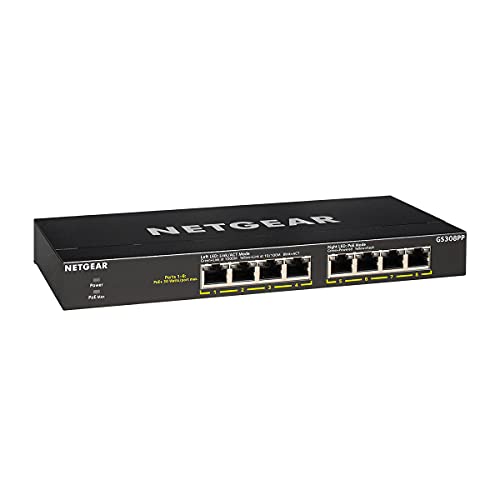
NETGEAR 8-Port PoE Gigabit Ethernet Unmanaged Network Switch GS308PP
$69.99An 83 W budget across eight PoE ports, which carries six to eight class 3 cameras with the headroom that stops a switch shutting a port down on a cold night when the heaters run.
- PoE ports
- 8
- PoE budget
- 83 W
- PoE standard
- 802.3af/at
Prices change often.

TP-Link 8 Port Gigabit PoE Switch, 8 PoE+ Ports at 126W
$89.99A 126 W budget is enough for eight class 3 cameras at their full standards allocation of 15.4 W each, with nothing left to chance.
- PoE ports
- 8
- PoE budget
- 126 W
- PoE standard
- 802.3af/at
Prices change often.

TP-Link LS108GP 8 Port PoE Gigabit Ethernet Switch
$57.49The cheapest switch here that still carries a realistic budget for four cameras, and the right choice when the camera count is genuinely four.
- PoE ports
- 8
- PoE standard
- 802.3af/at
Prices change often.

NETGEAR 8 Port PoE Gigabit Ethernet Easy Smart Managed Switch GS308EP
$79.99Managed, so the cameras can be put on their own VLAN and kept off the rest of the home network, which is the single most effective thing you can do about camera firmware you do not control.
- PoE ports
- 8
- PoE standard
- 802.3af/at
Prices change often.

NETGEAR 16-Port PoE Gigabit Ethernet Unmanaged Network Switch GS316P
$135.75Sixteen ports with a 115 W budget, which suits a mixed system where not every port is a camera.
- PoE ports
- 16
- PoE budget
- 115 W
- PoE standard
- 802.3af/at
Prices change often.
Common questions
How many cameras can the NETGEAR GS308PP actually power?
Run through the IEEE 802.3af class 3 allocation of 15.4 watts per port, the published 83 watt total budget computes to about four full class 3 cameras with the standard 20 percent safety headroom, or about five without any headroom margin at all. Eight full class 3 cameras would need 123.2 watts, well beyond this switch published budget.
Why does the switch have 8 ports if it cannot power 8 cameras at full class?
Port count and power budget are two separate specifications. Many installs mix camera classes, run fewer cameras than ports, or rely on cameras drawing less than their maximum classification in practice, all of which let more ports carry devices than the strict worst-case wattage math alone would suggest. The 83 watt figure is the honest ceiling for worst-case class 3 loading.
What happens if I plug in more cameras than the power budget supports?
The switch will not deliver full power to every port simultaneously; it will typically refuse to power additional ports past its budget, or drop power to ports intermittently under peak load, such as a cold night when heaters or strong infrared illuminators draw more current across several cameras at once.
Is this switch managed or unmanaged?
The GS308PP is unmanaged, meaning it has no VLAN, port prioritization or web configuration interface. NETGEAR sells a managed sibling, the GS308EP, for buyers who want to isolate cameras onto their own network segment.
What switch should I buy instead for eight full-power cameras?
The TP-Link 8 port switch in this catalog publishes a 126 watt total budget, which computes to just over 2 percent raw spare capacity for eight full class 3 cameras at 123.2 watts total. That is tight but sufficient, unlike the GS308PP 83 watt budget, which falls well short of that same load.
Get the system planning sheet
The camera count, storage and PoE budget worksheet, plus the wiring checklist, as one printable page.
Keep going
Before you point a camera at anything. Aim cameras at your own property and your own boundary, never into a neighbour's windows or across their garden. Cameras in bedrooms, bathrooms, or anywhere else a person reasonably expects privacy are a serious legal problem, and that includes guests, lodgers and anyone who works in your home. Audio is legally different from video, many US states require the consent of every party to a recorded conversation, and several recorders capture audio by default, so check your own state before you enable it. Some places require visible notice that recording is taking place, and landlords and homeowner associations often impose their own rules on top. This is researched general information and not legal advice, and the law varies by state and by country.
And once it is installed. Change every default password, keep the firmware updated, and be clear with yourself about where the footage goes: a cloud camera means a third party holds recordings of your home, while a local recorder keeps them in your house. That is a genuine buying consideration, not a technicality.