Best Network Tools for a Camera Install
The Klein Tools VDV526-100 is the pick to start with at $21.00: a single button tester that catches the split pair and reversed pair faults responsible for roughly one in ten cable runs terminated wrong the first time.
Running Cat6 to a PoE camera looks like the hard part of an install, but the wiring itself is rarely what fails. Terminating the connector wrong is the actual point of failure, and it happens often enough that a cable tester is not an optional accessory, it is the tool that turns a guess into a verified connection.
This page covers the testers, crimpers, and identification tools worth owning for a camera install, from a single button pass or fail tester through the multi run kits a larger installation actually needs.
| Tool | Function | Price |
|---|---|---|
| Klein VDV526-100 | Single button pass or fail tester | $21.00 |
| Klein VDV526-200 | Tester with cable length reporting | $59.97 |
| Klein Scout Pro 3 | Multi run tester with numbered remotes | $96.61 |
| Klein Tone Probe Kit | Identifies one cable in an unlabeled bundle | $49.98 |
| ZoeRax Crimp Kit | Pass through crimper, tester, and stripper | $29.99 |
| ZOERAX 14 in 1 Kit | Complete crimp, punch down, and test kit | $64.99 |
| VCE Cat6 Keystone Jacks, 25 Pack | Termination jacks for solid cable | $25.99 |
| TRENDnet 24-Port Patch Panel | Landing point for every camera run | $21.99 |
Why test every cable run before closing the wall?
Roughly one cable run in ten is terminated wrong on the first attempt, whether from a reversed pair, a split pair, or a connector crimped before the wire order was checked. Any of those faults can still let a camera connect at a reduced speed, so the fault does not show up until the camera drops frames under load weeks later, long after the soffit is closed and the ladder is put away.
A tester costs a fraction of what a return trip to open the same wall costs. The Klein VDV526-100 finds the common faults for twenty one dollars, which makes skipping it one of the few decisions on a camera install with no real upside.
When does an install need more than a basic pass or fail tester?
A basic tester answers one question: does this cable pass or fail. The Klein VDV526-200 adds cable length reporting, which confirms a run stays inside the 100 meter limit standard Ethernet is rated for rather than assuming it from a drawing that may not match what was actually pulled. The Klein Scout Pro 3 goes further with numbered remotes that identify which of many identical cables in a bundle is which, exactly the problem a sixteen camera install creates.
Pass through connectors, like the ones in the ZoeRax crimp kits, solve a different problem: they let the individual conductors extend past the front of the plug so the installer can visually confirm wire order before crimping rather than after, when a mistake means cutting the plug off and starting over.
Beginner pick
The Klein Tools VDV526-100 is the cheapest tester worth owning and covers everything a one or two camera install needs to verify before closing anything up.
Intermediate pick
The ZOERAX 14 in 1 kit bundles a crimper, punch down tool, stripper, and tester together, which is the complete set a first whole house install actually needs in one purchase.
Expert pick
The Klein Tools Scout Pro 3 tests and identifies multiple cables at once with numbered remotes, the tool that turns a sixteen camera install from a day of guessing which cable goes where into an afternoon.
How we chose these network tools
These picks rest on published tool specifications and verified owner reviews describing real installs, not on our own comparison of every tester on a bench. We have not run a side by side trial of these tools ourselves and never describe a fault detection capability the manufacturer did not state in its own documentation.
Price mattered directly in this ranking, since a tester or crimper that sits unused because it cost too much for a one time home install defeats its own purpose. The cheapest tool that reliably does the job outranks a more capable tool aimed at a professional installer running many jobs a year.
The network tools we compared

Klein Tools VDV526-100 Network LAN Cable Tester with Remote
$21.00The cheapest tester worth owning, and it catches the split pair and reversed pair faults that make a camera connect at 100 Mbps and then drop under load.
Check price on AmazonPrices change often.

Klein Tools VDV526-200 LAN Scout Jr Cable Tester Kit
$59.97Reports cable length as well as continuity, which is how you confirm a run is inside the 100 metre limit rather than assuming it from the drawing.
Check price on AmazonPrices change often.
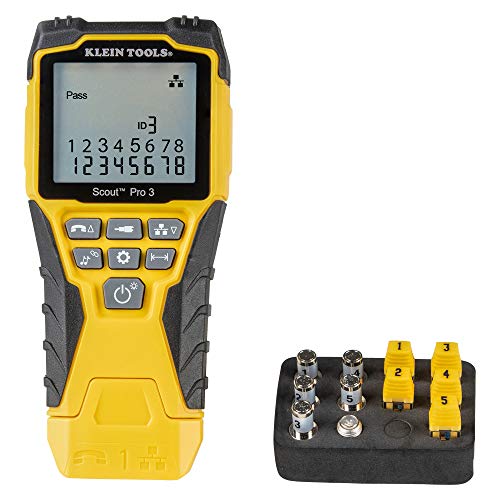
Klein Tools VDV501-851 Scout Pro 3 Tester Starter Set
$96.61Tests and identifies multiple runs at once with numbered remotes, which is what turns a sixteen camera install from a day of guessing into an afternoon.
Check price on AmazonPrices change often.

Klein Tools VDV500-705 Wire Tracer Tone Generator and Probe Kit
$49.98Finds which cable in a bundle is which without cutting anything, which is the problem every second install run creates.
Check price on AmazonPrices change often.

ZoeRax Ethernet Crimping Tool Kit with RJ45 Pass Through Connectors
$29.99Pass through connectors let the conductors out of the front of the plug so the wire order can be checked before crimping, which removes the most common termination mistake.
Check price on AmazonPrices change often.
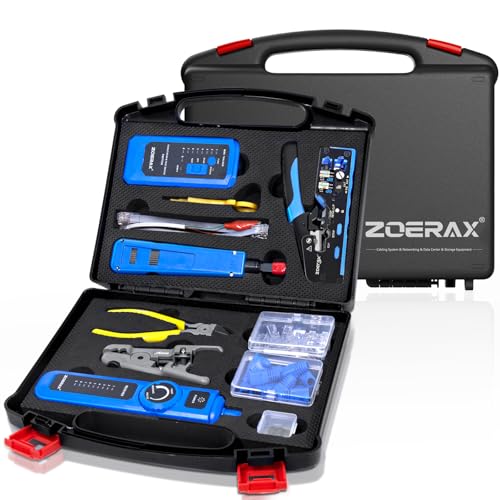
ZOERAX 14 in 1 Professional Network Tool Kit with Crimp Tool and Connectors
$64.99Crimper, punch down tool, stripper, tester and connectors together, which is everything a first camera install needs in one purchase.
Check price on AmazonPrices change often.

VCE UL Listed Cat6 Keystone Jacks 10Gbps, 25 Pack
$25.99Solid core cable is meant to terminate into a punch down jack, not into a crimped plug, and a 25 pack covers a whole house with spares.
Check price on AmazonPrices change often.

TRENDnet 24-Port Blank Keystone 1U Patch Panel, TC-KP24
$21.99Every camera run lands in one labelled place, which is the difference between a five minute fault find and an afternoon in the roof.
Check price on AmazonPrices change often.
Common questions
Do I really need a cable tester for a home camera install?
Yes. Roughly one cable run in ten is terminated wrong on the first attempt, and a faulty termination can still let a camera connect, just at a reduced or unstable speed. That fault often does not show up until weeks later when the camera drops frames under load. A basic tester costs about twenty dollars and catches the problem before the wall is ever closed.
What is a pass through RJ45 connector and why does it matter?
A pass through connector lets the eight individual wires extend past the front of the plug so the installer can visually check the wire order before crimping, rather than after. With a standard connector, a wrong wire order means cutting the plug off and starting over. Kits like the ZoeRax crimper include pass through connectors specifically to reduce that mistake.
How do I identify which cable is which in a bundle of identical runs?
A tone generator and probe kit, like the Klein VDV500-705, sends a tone down one cable that a handheld probe can pick up at the other end without cutting or opening anything. For a larger install with many identical runs, a tester with numbered remotes, like the Klein Scout Pro 3, identifies several runs at once instead of one at a time.
Should I crimp plugs directly onto solid Ethernet cable?
Solid conductor cable, the kind used for permanent runs, is designed to terminate into a punch down keystone jack or patch panel, not to be crimped into a plug repeatedly, since the solid wire can crack from flexing that a plug connector expects from stranded cable instead. Keystone jacks and a patch panel give solid cable the termination method it was actually built for.
What does a cable length tester actually confirm?
It confirms how long a run actually is once installed, rather than how long it was assumed to be from a floor plan. Ethernet is rated to 100 meters for standard PoE performance, and a run that looks short on a drawing can end up longer once it follows an actual route through walls and around obstacles. A tester like the Klein VDV526-200 reports that length directly.
Get the system planning sheet
The camera count, storage and PoE budget worksheet, plus the wiring checklist, as one printable page.
Keep going
Before you point a camera at anything. Aim cameras at your own property and your own boundary, never into a neighbour's windows or across their garden. Cameras in bedrooms, bathrooms, or anywhere else a person reasonably expects privacy are a serious legal problem, and that includes guests, lodgers and anyone who works in your home. Audio is legally different from video, many US states require the consent of every party to a recorded conversation, and several recorders capture audio by default, so check your own state before you enable it. Some places require visible notice that recording is taking place, and landlords and homeowner associations often impose their own rules on top. This is researched general information and not legal advice, and the law varies by state and by country.
And once it is installed. Change every default password, keep the firmware updated, and be clear with yourself about where the footage goes: a cloud camera means a third party holds recordings of your home, while a local recorder keeps them in your house. That is a genuine buying consideration, not a technicality.