Security Camera Upload Bandwidth Calculator
Cameras only ever use upload, and residential broadband has far less upload than download. Four 4K cameras recording continuously to the cloud need about 24 Mbps of upload, which saturates most home connections.
Values update as you change the inputs. Where a figure cannot be computed honestly from what manufacturers publish, this calculator says so rather than showing a zero.
Record locally and use none of this
Chosen for this calculation.

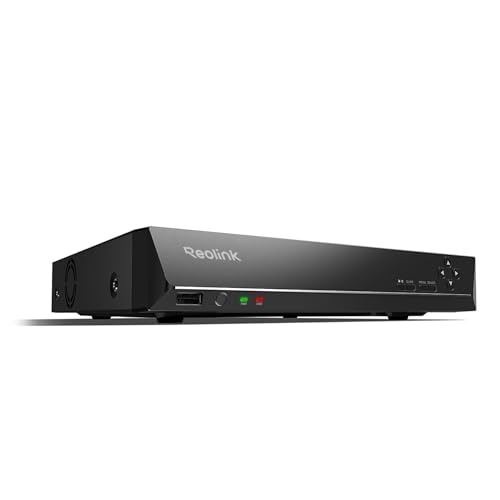
REOLINK RLN8-410 8CH NVR Network Video Recorder PoE
$349.99Eight PoE ports built into the recorder, so the cameras get power and data from the same box and there is no separate switch to budget.
- Channels
- 8
- PoE ports
- 8
Prices change often.
REOLINK RLN16-410 16CH NVR Network Video Recorder PoE
$459.99Sixteen channels for a property that has outgrown eight, and the usual reason to buy one is a detached garage or a second building.
- Channels
- 16
Prices change often.

ANNKE 12MP 8CH PoE Network Video Recorder, No HDD
$159.99Supplied without a drive, which is the cheaper path when you are fitting a surveillance drive sized from your own retention calculation rather than accepting whatever came in the box.
- Channels
- 8
- Resolution
- 12 MP
- PoE ports
- 8
Prices change often.

TRENDnet 8-Channel UHD PoE NVR, TV-NVR1508
$107.99TRENDnet is a networking company rather than a camera company, and this recorder takes standards compliant cameras rather than locking to one brand.
- Channels
- 8
- PoE ports
- 8
Prices change often.

Lorex V-Series 4K 8-Ch 1TB Network Video Recorder
$399.99Ships with a 1TB drive already fitted, which is enough for four cameras for about two weeks and is a sensible starting point to expand from.
- Channels
- 8
- Drive included
- 1 TB
Prices change often.
The formula
upload Mbps = cameras x bitrate Mbps x duty cycle
Duty cycle is the fraction of the day a camera actually uploads. Continuous cloud recording is 1.0, while event clip upload might be 0.02, which is why clip services work on connections that could never carry a continuous stream.
Common questions
How much upload bandwidth do 4 security cameras need for cloud recording?
Four cameras recording continuously to the cloud at a typical 8MP H.265 bitrate of 6 Mbps each need about 24 Mbps of sustained upload. Most residential connections have far less upload than download, so a plan advertised as 20 Mbps upload would already be oversubscribed by this system alone, before anything else in the house touches the connection.
Why does upload speed matter more than download speed for cameras?
Cameras only ever send video out, they never receive it, so continuous recording load falls entirely on upload speed. Residential broadband is deliberately asymmetric, built with far more download than upload, which is why a connection that streams video comfortably can still choke on a handful of cameras uploading to the cloud at the same time.
What percentage of my upload speed should security cameras use?
Staying under about 70 percent of sustained upload is the practical ceiling. Beyond that point the whole connection starts feeling slow, because acknowledgement packets for downloads get delayed behind the camera upload traffic, even though nothing is technically failing yet. Past 100 percent, uploads start to queue and camera streams begin dropping frames or disconnecting outright.
What is duty cycle and why does it change upload bandwidth so much?
Duty cycle is the fraction of the day a camera actually uploads. Continuous cloud recording runs at a duty cycle of 1.0, using its full bitrate around the clock, while an event clip service might upload only 2 percent of the day. That difference is why clip based cameras work on connections that could never carry continuous streaming from the same cameras.
How much monthly data does continuous cloud camera upload use?
At a sustained 24 Mbps, four cameras uploading continuously move roughly 7.8 terabytes a month, calculated from that upload rate running for every second of every day. That volume can trigger data caps on some residential plans and especially on cellular or satellite connections, which is a strong argument for recording locally rather than uploading everything to the cloud continuously.
Get the system planning sheet
The camera count, storage and PoE budget worksheet, plus the wiring checklist, as one printable page.
Keep going
A calculated figure is a planning number, not a promise. Every answer here comes from published standards and manufacturer specifications, and real installations vary with light, weather, scene motion and how a camera is actually aimed. Where a figure cannot be computed honestly from what manufacturers publish, this calculator says so rather than showing a zero.
Before you point a camera at anything. Aim at your own property and your own boundary, never into a neighbour's windows. Cameras in bedrooms, bathrooms or anywhere with a reasonable expectation of privacy are a serious legal problem, including for guests and anyone who works in your home. Audio is legally different from video, many US states require the consent of every party to a recorded conversation, and several recorders capture audio by default, so check your own state before enabling it. This is researched general information and not legal advice.