Troubleshooting Security Camera Dropouts
Intermittent dropouts on a single wired camera are almost always an Ethernet run over the 100 meter ANSI/TIA-568 channel limit or a bad termination, not a faulty camera. Dropouts on several cameras at the same time usually mean the PoE switch has run out of power budget.
A camera that drops out is not, in most cases, a broken camera. It is far more often a cable that was measured wrong, a connector that was crimped in a hurry, or a switch that was sized for the cameras a home had a year ago rather than the ones plugged in now. Replacing the camera first is the most expensive way to fix any of those.
The order below goes cheapest and most likely first. Nothing on this page requires opening a camera or buying anything until the checks point at a specific cause, and most dropout cases resolve in the first three steps.
| Step | What to check | Likely cause if found | Typical cost to fix |
|---|---|---|---|
| 1 | Cable length and routed path | Run exceeds the 100 m TIA-568 channel | $0 to re-route, $20 to $50 for a repeater |
| 2 | Connector and termination | Bad crimp or a wet, uncovered RJ45 | $5 to $20 for new ends and a junction box |
| 3 | PoE switch budget | Switch has no spare budget for the class in use | $0 to check, $60 to $200 to upgrade the switch |
| 4 | Wi-Fi signal and channel congestion | Distance, walls or a crowded band | $0 to change channel, $30 to $60 for a mesh point |
| 5 | Firmware and drive health | Outdated firmware or a failing recorder drive | $0 for firmware, $80 or more to replace a drive |
| Class | Standard | Switch reserves (PSE) | Camera draws (PD) |
|---|---|---|---|
| 0 | 802.3af | 15.4 W | Up to 12.95 W (unclassified, treated as full) |
| 3 | 802.3af | 15.4 W | Up to 12.95 W (most fixed cameras) |
| 4 | 802.3at | 30.0 W | Up to 25.5 W (heaters, wipers, strong IR) |
Is it one camera or several at once?
This single question splits the whole troubleshooting tree. A dropout on exactly one camera while everything else stays connected points at that camera's cable, its connector, or the camera itself. A dropout that hits several cameras at the same moment, especially all the ones on one switch, points at shared infrastructure: the switch's power budget, its uplink, or the router upstream of it.
Write down which cameras drop and when. A pattern that lines up with a heater or a light turning on somewhere in the house is a strong clue toward a shared electrical or PoE budget cause rather than a bad cable.
Check the cable length before touching anything else
The ANSI/TIA-568 Ethernet channel limit is 100 meters, about 328 feet, and that figure is not the horizontal cable alone. It is the whole channel: 90 meters of solid horizontal cable plus 10 meters of stranded patch leads at both ends combined. A run that looks fine on a tape measure at 95 meters of horizontal cable has already spent most of its patch allowance before a single patch cord is added.
Exceeding the limit rarely fails cleanly. A run slightly over spec often works when everything is calm, then drops intermittently, negotiates down to 100 Mbps instead of gigabit, or fails specifically when the temperature swings and the copper's resistance changes with it. That pattern, working fine most of the time and failing at odd moments, is the signature of an over-length or badly terminated run far more often than it is a signature of a failing camera.
- Measure the actual routed path, not the straight-line distance between the camera and the switch
- Add every patch cord at both ends into the same 100 meter total
- A run that measures close to the limit on paper is a run to re-route or extend with a repeater, not a run to hope about
Check the connector and the termination
A crimped RJ45 end done quickly, or one that has spent a season getting rained on before a junction box went up, is one of the most common causes of an intermittent connection that a cable tester will not always catch on a simple continuity check. Wiggle the connector at the camera end while someone watches the recorder for a reconnect event. A dropout that follows the wiggle is a termination problem, not a camera problem.
Outdoor connections that were never boxed are especially prone to this. Moisture works into an unprotected RJ45 over months, corrodes the contacts gradually, and produces exactly the kind of dropout that looks random until someone opens up the connection and finds green corrosion on the pins.
Check the PoE budget on the switch
IEEE 802.3 PoE is delivered in classes, and the switch has to reserve power on the PSE side of that class regardless of what the camera actually draws. Class 3 under 802.3af reserves 15.4 watts per port even though the camera itself pulls up to 12.95 watts; class 4 under 802.3at reserves 30 watts against a 25.5 watt draw; the 802.3bt classes go up to 90 watts reserved against 71.3 watts drawn. Eight class 3 cameras need 123.2 watts of switch budget, not the smaller number their combined draw would suggest.
A switch that runs out of budget does not damage anything. It sheds ports, typically starting with the highest numbered port or the lowest priority port on a managed switch, and that dropped port looks exactly like a dead camera to someone glancing at the recorder. Because budgets are most likely to be exceeded when heaters or de-icing elements switch on, this specific failure tends to arrive on the coldest night of the year, right when a home most needs its cameras working.
Check for interference on wireless and battery cameras
A camera on Wi-Fi rather than a wired PoE run has a different failure mode. Distance from the router, a wall or two of interference, and a crowded 2.4 GHz band shared with a dozen other household devices all produce dropouts that look identical to a hardware fault. Moving the camera a few feet, switching the router to a less congested channel, or adding a mesh point closer to the camera resolves a large share of wireless dropouts without touching the camera at all.
Battery powered cameras add a second variable: a battery running low can cause a camera to disconnect or delay its response well before it reports itself as critically low, especially in cold weather where usable capacity drops.
Check the NVR, the recorder software and its drive
Outdated firmware on the camera, the recorder, or the PoE switch itself causes reconnect loops that have nothing to do with the physical cable. Check for a pending update on each device in the chain before assuming a hardware fault. A recorder's hard drive nearing the end of its life can also produce dropped or corrupted recordings that look like a camera dropout when the camera itself never actually disconnected.
When it is time to call an electrician or an installer
Running new mains wiring, adding a dedicated circuit for a switch or NVR, or working inside a panel is licensed electrician work in most places, not a weekend project. If troubleshooting points at the building's power rather than the camera network itself, that is the point to call a professional rather than open a breaker panel.
The gear that matches this answer

Klein Tools VDV526-100 Network LAN Cable Tester with Remote
$21.00The cheapest tester worth owning, and it catches the split pair and reversed pair faults that make a camera connect at 100 Mbps and then drop under load.
Check price on AmazonPrices change often.

Klein Tools VDV500-705 Wire Tracer Tone Generator and Probe Kit
$49.98Finds which cable in a bundle is which without cutting anything, which is the problem every second install run creates.
Check price on AmazonPrices change often.

Revotech 2 Port PoE Extender, PoE+ Repeater, 100 Meters
$16.79The standards compliant answer to a run longer than 100 metres, which is a real constraint on any property with a gate or an outbuilding.
- PoE standard
- 802.3af/at
Prices change often.

TRUE CABLE Cat6 Direct Burial Bulk Ethernet Cable, Shielded F/UTP, 1000ft, 23AWG
$300.99Shielded, which is worth the extra cost and the extra grounding work only when the run parallels mains wiring or a long fence line.
- Cable category
- Cat6
- Conductor gauge
- 23 AWG
- Conductor
- Solid bare copper
- Length
- 1000 ft
Check first:Shielded cable must be properly grounded at one end or the shield can make interference worse rather than better.
Check price on AmazonPrices change often.
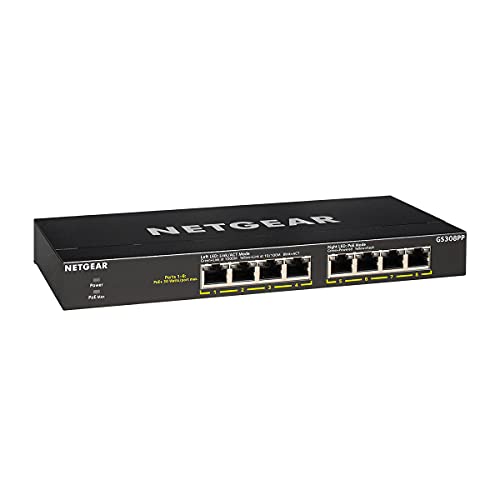
NETGEAR 8-Port PoE Gigabit Ethernet Unmanaged Network Switch GS308PP
$69.99An 83 W budget across eight PoE ports, which carries six to eight class 3 cameras with the headroom that stops a switch shutting a port down on a cold night when the heaters run.
- PoE ports
- 8
- PoE budget
- 83 W
- PoE standard
- 802.3af/at
Prices change often.

ZoeRax Ethernet Crimping Tool Kit with RJ45 Pass Through Connectors
$29.99Pass through connectors let the conductors out of the front of the plug so the wire order can be checked before crimping, which removes the most common termination mistake.
Check price on AmazonPrices change often.
Common questions
My camera worked fine for months and now drops out randomly. What changed?
Nothing has to have physically changed for a marginal cable run to start failing. A run close to the 100 meter TIA-568 limit can pass for a long stretch and then start dropping when temperature swings change the copper's resistance, or when a connector that was already degrading finally crosses the line into unreliable. Check length and the connector before assuming the camera itself failed.
All my cameras dropped at the same time. Is that one bad camera cable?
No. A simultaneous drop across several cameras points at shared infrastructure rather than an individual cable: the PoE switch running out of power budget, a firmware update reboot, or an upstream router or internet outage. Check the switch's port lights and its budget before touching any individual camera cable.
Can a cable that tests fine with a simple continuity tester still cause dropouts?
Yes. A basic continuity tester confirms the eight wires reach the far end, but it will not catch a marginal termination, crosstalk from a damaged jacket, or a connection that only fails under vibration or thermal expansion. A proper cable certifier or a wiggle test while watching the recorder catches problems continuity testing misses.
Why does my camera drop out specifically on cold nights?
Cold triggers two common issues at once: a camera's heater or de-icing element can push its PoE class from 3 to 4, doubling the switch's reserved budget from 15.4 W to 30 W, and a switch sized exactly for summer class 3 draw will start shedding ports. Check the switch's spare budget against the winter class, not the summer one.
Should I replace the camera or the cable run first?
Check the cable run first in almost every case. Cable and connector problems are cheaper to diagnose and fix, and they are a far more common cause of intermittent dropouts than a failed camera. Swapping the camera to a known-good port and cable is a fast way to confirm which side of the connection is actually at fault.
Get the system planning sheet
The camera count, storage and PoE budget worksheet, plus the wiring checklist, as one printable page.
Keep going
Before you point a camera at anything. Aim cameras at your own property and your own boundary, never into a neighbour's windows or across their garden. Cameras in bedrooms, bathrooms, or anywhere else a person reasonably expects privacy are a serious legal problem, and that includes guests, lodgers and anyone who works in your home. Audio is legally different from video, many US states require the consent of every party to a recorded conversation, and several recorders capture audio by default, so check your own state before you enable it. Some places require visible notice that recording is taking place, and landlords and homeowner associations often impose their own rules on top. This is researched general information and not legal advice, and the law varies by state and by country.
And once it is installed. Change every default password, keep the firmware updated, and be clear with yourself about where the footage goes: a cloud camera means a third party holds recordings of your home, while a local recorder keeps them in your house. That is a genuine buying consideration, not a technicality.
Keep notes on which camera drops and when. That pattern, more than any single test, is usually what points at the real cause.