Best Wireless Security Cameras
The eufy Security eufyCam C37 4-Cam Kit is the pick for a full wireless system at $299.99: four cameras and a base station store footage locally, which eufy estimates saves up to $300 over three years compared with a subscription based system.
A wireless camera trades a cable for two ongoing dependencies: a battery that needs recharging or enough sun to keep a solar panel topped up, and in most cases a subscription to keep any footage past a live view. Both tradeoffs are worth understanding before buying rather than after the first bill arrives.
The seven cameras here split cleanly into two groups: five store footage locally, on the camera itself or on a base station in the house, and two depend on a cloud plan for recorded history. That single distinction is the biggest cost difference in this entire category.
| Model | Resolution | Power | Storage | Subscription needed |
|---|---|---|---|---|
| eufy SoloCam S340 | 3K | Solar and battery | On camera | No |
| eufy SoloCam S220 | 2K | Solar and battery | On camera | No |
| eufyCam C37 4-Cam Kit | 2K | Battery | Local base station | No |
| eufyCam C35 4-Cam Kit | 2K | Battery | Local base station | No |
| Blink Outdoor 4 | 1080p | Battery | Cloud | For recorded history |
| Ring Stick Up Cam | 1080p | Battery | Cloud | For recorded history |
| Tapo C400 | 1080p | Battery | microSD | No |
Why does the subscription matter more than the camera price?
As a simple illustration, a camera priced at 80 dollars with a 3 dollar monthly plan costs roughly 260 dollars over five years. A camera priced at 160 dollars with no plan at all costs 160 dollars over that same five years, and nothing more in every year after that. Across a system of four or more cameras, the subscription line item routinely outspends the hardware itself within two to three years.
Five of the seven wireless cameras in this roundup avoid that line item entirely: the two eufy SoloCam solar models and both eufyCam kits store footage on the camera or on a HomeBase at home, and the Tapo C400 writes to its own microSD card.
Cloud storage means someone else holds the footage
Blink Outdoor 4 and Ring Stick Up Cam both send recorded clips to the manufacturer's cloud by default, which means a third party, not the homeowner, holds the video of a family's own front yard. That is a genuine privacy tradeoff worth weighing against the convenience of viewing footage from any device without managing a local base station.
The eufy and Tapo cameras here keep that footage on hardware inside the house instead, which is the more private arrangement and the one this catalog leans toward when the choice is available.
Beginner pick
The eufy Security SoloCam S220 is the cheapest solar camera in this catalog that still stores locally rather than requiring a plan, which makes it a low risk way to cover one outbuilding with no power run.
Intermediate pick
The eufy Security eufyCam C35 4-Cam Kit gives a renter or first time buyer four cameras and a local base station for under 230 dollars, with magnetic mounts that need no drilling.
Expert pick
The eufy Security eufyCam C37 4-Cam Kit adds 360 degree pan and tilt tracking on each camera to the same local storage arrangement, built for a system meant to cover a whole property rather than one entry point.
How we chose these wireless security cameras
These rankings come from published battery life, resolution, and storage specifications alongside verified owner reviews on each retailer listing. We did not install and run these cameras side by side ourselves, and we never describe a battery life or detection range figure that the manufacturer did not state first.
We left out the wide field of unbranded wifi cameras that share factories and carry no visible firmware update path, since a camera with a network connection and no support history is a worse security choice than skipping a camera position entirely.
The wireless cameras we compared

eufy Security SoloCam S340, 3K Dual-Lens Solar Security Camera
$159.99Solar charged with local storage on the camera, so it needs neither a cable nor a subscription, which is the only wireless configuration this site recommends without reservation.
- Power
- Solar and battery
- Storage
- On camera
Prices change often.

eufy Security SoloCam S220, Solar Security Camera, Wireless Outdoor
$69.99The cheapest solar camera here that stores locally rather than requiring a plan to keep anything.
- Power
- Solar and battery
- Storage
- On camera
Prices change often.
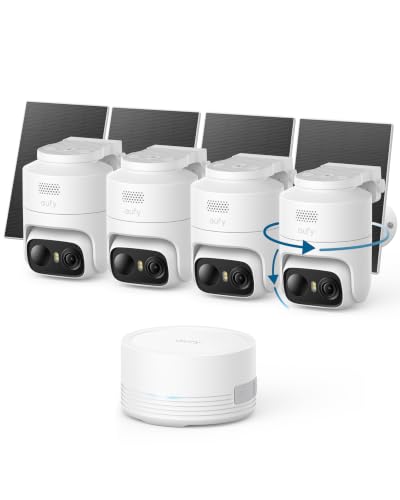
eufy Security eufyCam C37 4-Cam Kit, 360 degree Pan and Tilt
$299.99Four cameras and a base station that holds the footage at home, which keeps a wireless system out of the subscription trap.
- Power
- Battery
- Storage
- Local base station
Prices change often.
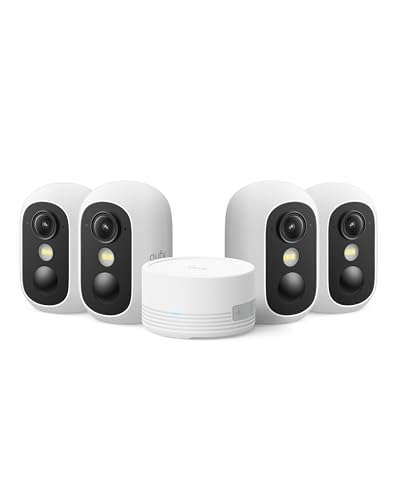
eufy Security eufyCam C35 4-Cam Kit, Wireless Indoor and Outdoor Camera
$229.99The lower cost four camera wireless kit, still with a local base station rather than cloud only storage.
- Power
- Battery
- Storage
- Local base station
Prices change often.

Blink Outdoor 4 Wireless Smart Security Camera, 1080p
$129.99The cheapest name brand wireless camera, and an honest demonstration of the trade: 1080p puts roughly a third of the pixels on the scene that a 4K PoE camera does.
- Resolution
- 2 MP
- Power
- Battery
Check first:Full functionality expects a subscription, and 1080p will not reach DORI identify distance at any useful range.
Check price on AmazonPrices change often.

Ring Outdoor Cam, Stick Up Cam, Weather-Resistant HD Security Camera
$79.99Widely supported and simple to place, and the clearest example on this site of a camera where a third party holds the recordings of your home by default.
- Power
- Battery
Check first:Recording history requires a subscription, and footage is held by the vendor rather than by you.
Check price on AmazonPrices change often.
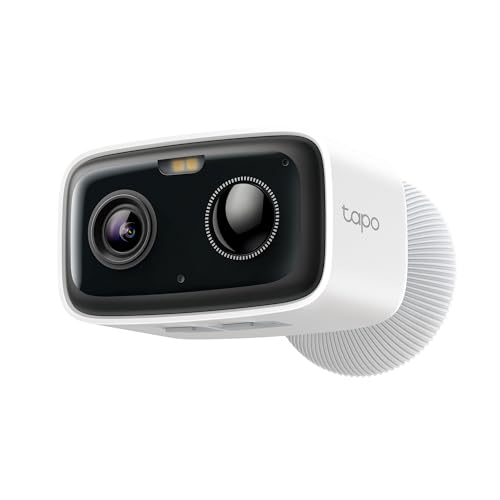
Tapo 1080p Outdoor Wireless Security Camera, Up to 180-Day Battery, C400
$44.99A very long battery life and local microSD storage, so it can run without a subscription.
- Resolution
- 2 MP
- Power
- Battery
- Storage
- microSD
Prices change often.
Common questions
Do wireless security cameras need a monthly subscription?
Not all of them. Blink and Ring cameras in this catalog need a paid plan to keep recorded history, though live view usually works without one. The eufy and Tapo cameras here store footage locally instead, either on the camera itself, on a base station, or on a microSD card, with no ongoing fee required to keep any of it.
How long do wireless camera batteries actually last?
It depends heavily on how much motion the camera sees and the temperature it runs in. Solar cameras like the eufy SoloCam models recharge continuously with only a few hours of daily sun, while pure battery units without solar need a manual recharge every few months to a couple of years depending on the model and how often it records.
Is a solar security camera reliable in winter?
Only with real sun exposure. A shorter winter day and a lower sun angle both cut into how much a solar panel can recharge, and a north facing or heavily shaded mount will drain faster than it charges regardless of the season. A camera on a south facing wall with a clear sky view fares far better than one under an eave.
Can a wireless camera identify a face across a yard?
Rarely at 1080p, which is the resolution of the Blink Outdoor 4 and the Tapo C400 here. Identification under the DORI standard needs about 250 pixels per meter of scene, a bar that 1080p clears only at short range. The eufyCam models at 2K and the SoloCam S340 at 3K hold identification detail further out, but still not across a full yard.
Why does this catalog leave out cheap unbranded wifi cameras?
Because a network connected camera with no visible firmware support path is a worse outcome than not buying a camera at all. Unpatched vulnerabilities on a device that can see inside or around a home are a real risk, so this catalog only lists cameras from makers with a track record of shipping updates.
Get the system planning sheet
The camera count, storage and PoE budget worksheet, plus the wiring checklist, as one printable page.
Keep going
Before you point a camera at anything. Aim cameras at your own property and your own boundary, never into a neighbour's windows or across their garden. Cameras in bedrooms, bathrooms, or anywhere else a person reasonably expects privacy are a serious legal problem, and that includes guests, lodgers and anyone who works in your home. Audio is legally different from video, many US states require the consent of every party to a recorded conversation, and several recorders capture audio by default, so check your own state before you enable it. Some places require visible notice that recording is taking place, and landlords and homeowner associations often impose their own rules on top. This is researched general information and not legal advice, and the law varies by state and by country.
And once it is installed. Change every default password, keep the firmware updated, and be clear with yourself about where the footage goes: a cloud camera means a third party holds recordings of your home, while a local recorder keeps them in your house. That is a genuine buying consideration, not a technicality.