PoE Switch vs PoE Injector
Use an injector for one or two cameras added to an existing non-PoE network, where a roughly $16 to $20 injector is the entire cost. Once a system reaches three or four cameras, an 8 port PoE switch with an 80 to 126 W power budget becomes the cheaper and simpler path per camera, and it scales further without adding another box for every new camera.
Both an injector and a switch solve the same problem, getting PoE power onto an Ethernet cable, but they solve it at different scales. An injector is a small box with one PoE output, designed to add power to a single Ethernet run coming from a plain, non-PoE switch or router. A PoE switch has that power capability built into every port, and delivers it to as many cameras as it has ports and its power budget can support.
The math is straightforward once camera count enters the picture. One injector powers one camera, so a system of six cameras needs six injectors, each doing the exact same job a single PoE switch could do for all six at once, usually for less total money and far less clutter.
| Factor | Injector | Switch |
|---|---|---|
| Cameras powered | One per injector | As many as ports and budget allow |
| Typical cost, catalog prices | $16 to $20 each | $57 to $170 for 8 to 16 ports |
| Best camera count | One or two | Three or more |
| Expansion | Buy another injector each time | Plug into a spare port |
| Network management | None | Managed models add VLANs, per port control |
What exactly does an injector do?
It sits between a non-PoE switch or router and a single camera, taking a standard Ethernet connection in and adding DC power to the same cable going out to the camera. The injectors in this catalog cover both major standards: a 15.4 W 802.3af injector for a basic fixed camera, and a 30 W 802.3at injector for anything drawing more, such as a small PTZ head.
What does a PoE switch do differently?
Every port on a PoE switch can supply power directly, drawing from one shared power budget specified in watts, such as the 83 W budget on an 8 port switch in this catalog. That budget has to be checked against the sum of what the connected cameras will actually draw, using the PSE side figures IEEE 802.3 defines for each power class, not the camera's own lower draw figure, since the switch has to reserve the higher number.
At what camera count does a switch start winning on price?
Using real prices from this catalog: a basic 802.3af injector runs around $16, so two injectors cost roughly $32. An 8 port PoE switch with a real power budget runs from around $57 to $70. Two injectors are still cheaper than a switch at two cameras, but a third injector pushes the injector total past $48, and a fourth past $64, at which point the switch is either cheaper outright or close enough that its extra ports for future cameras make it the better buy.
- One or two cameras: an injector per camera is usually cheaper
- Three to four cameras: costs converge, and a switch starts adding expansion room
- Five or more cameras: a switch is clearly cheaper per camera and far tidier
Is there a reliability difference?
A PoE switch centralizes both the network connection and the power delivery in one managed piece of equipment, which is easier to monitor, and a managed model can even isolate cameras on their own VLAN. An injector chain has more individual boxes, each a separate point where a power brick or connector can fail, though a single injector failing only affects the one camera behind it rather than the whole system, which is a real advantage for very small setups.
When is an injector still the right call, even at scale?
When only one camera on an otherwise finished network needs adding, and buying a whole new switch just for that one port would mean re-terminating cables into a new box for no reason. An injector slots into the existing setup with zero disruption to the rest of the network, which is worth the small price premium per camera when the alternative is redoing cabling that already works.
The verdict
Reach for an injector when adding one, or possibly two, cameras to a network that has no PoE at all. Reach for a PoE switch as soon as a system is being planned from three or more cameras, since it becomes cheaper per camera, centralizes power delivery in one place, and leaves spare ports for whatever gets added next.
The gear that matches this answer
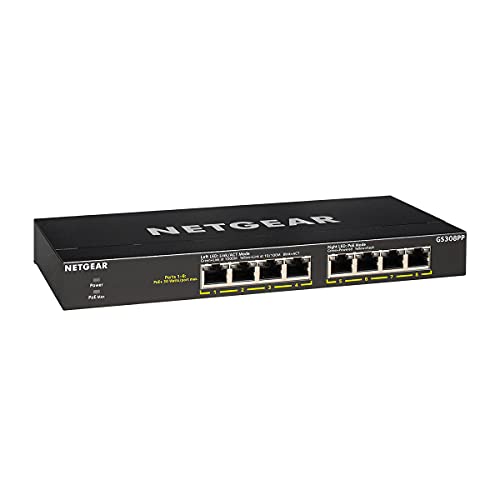
NETGEAR 8-Port PoE Gigabit Ethernet Unmanaged Network Switch GS308PP
$69.99An 83 W budget across eight PoE ports, which carries six to eight class 3 cameras with the headroom that stops a switch shutting a port down on a cold night when the heaters run.
- PoE ports
- 8
- PoE budget
- 83 W
- PoE standard
- 802.3af/at
Prices change often.

TP-Link 8 Port Gigabit PoE Switch, 8 PoE+ Ports at 126W
$89.99A 126 W budget is enough for eight class 3 cameras at their full standards allocation of 15.4 W each, with nothing left to chance.
- PoE ports
- 8
- PoE budget
- 126 W
- PoE standard
- 802.3af/at
Prices change often.

TP-Link Omada PoE+ Injector, Up to 30W, Gigabit, POE160S
$19.99Thirty watts is the full 802.3at allocation, so this injector will run anything up to and including a small PTZ camera.
- PoE standard
- 802.3at
- PoE budget
- 30 W
Prices change often.
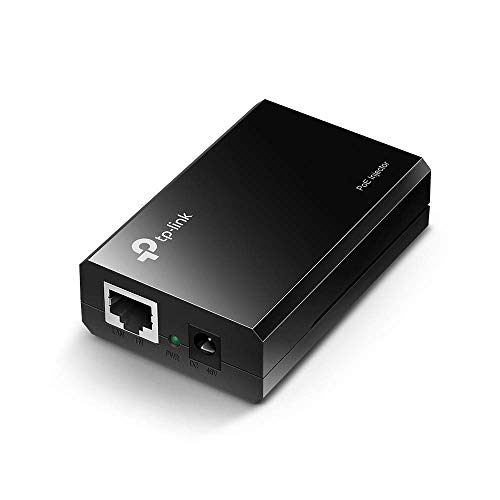
TP-Link Omada PoE Injector, Up to 15.4W, Gigabit, POE150S
$15.99The 802.3af version at a lower price, which is all a fixed bullet or dome camera needs.
- PoE standard
- 802.3af
- PoE budget
- 15.4 W
Prices change often.

TP-Link LS108GP 8 Port PoE Gigabit Ethernet Switch
$57.49The cheapest switch here that still carries a realistic budget for four cameras, and the right choice when the camera count is genuinely four.
- PoE ports
- 8
- PoE standard
- 802.3af/at
Prices change often.
Common questions
Can I add a PoE injector to a network that already has a non-PoE switch?
Yes, that is exactly what an injector is for. It sits between the existing non-PoE switch and the camera, adding power to the cable without requiring any change to the switch itself. This is the simplest way to add a single PoE camera to a network that was never built with PoE in mind.
How do I know what PoE budget my switch actually needs?
Sum the PSE side power figure for each camera's IEEE 802.3 class, not the camera's own lower draw figure, since the switch has to reserve the higher number. A common rule of thumb adds roughly 20 percent headroom on top of that sum, which is why a switch rated well above the bare minimum, rather than exactly matching it, is the safer purchase.
Does a PoE injector slow down the network connection?
No. A properly rated injector, matched to gigabit speeds like the ones in this catalog, passes data through at full speed while adding power to the same cable. Any slowdown would come from an underrated or faulty injector, not from the basic principle of injecting power onto an Ethernet line.
What happens if I plug a non-PoE device into a PoE switch port?
Nothing bad, in almost all cases. PoE switches negotiate with the connected device before sending any power, and a non-PoE device simply will not request it, so it operates as a normal Ethernet connection. This negotiation is part of the IEEE 802.3 standard specifically to prevent damage to devices that were never meant to receive power over the cable.
Is a managed PoE switch worth the extra cost over an unmanaged one?
For most home installs, an unmanaged switch is perfectly adequate. A managed switch earns its higher price when isolating cameras on their own VLAN matters, which is genuinely the single most effective step available against camera firmware you do not control reaching the rest of a home network.
Get the system planning sheet
The camera count, storage and PoE budget worksheet, plus the wiring checklist, as one printable page.
Keep going
Before you point a camera at anything. Aim cameras at your own property and your own boundary, never into a neighbour's windows or across their garden. Cameras in bedrooms, bathrooms, or anywhere else a person reasonably expects privacy are a serious legal problem, and that includes guests, lodgers and anyone who works in your home. Audio is legally different from video, many US states require the consent of every party to a recorded conversation, and several recorders capture audio by default, so check your own state before you enable it. Some places require visible notice that recording is taking place, and landlords and homeowner associations often impose their own rules on top. This is researched general information and not legal advice, and the law varies by state and by country.
And once it is installed. Change every default password, keep the firmware updated, and be clear with yourself about where the footage goes: a cloud camera means a third party holds recordings of your home, while a local recorder keeps them in your house. That is a genuine buying consideration, not a technicality.