Setting Up a Network Video Recorder
An NVR is sized backward from a retention target: fourteen days is a reasonable minimum and thirty days is the more common comfortable target, and the drive has to be chosen to match the number of cameras, resolution, codec, and whether recording is continuous or motion-only, not the other way round. Neither figure is a legal requirement for a private home.
An NVR setup only looks complicated because it has several moving parts working together: how many cameras, how they record, how much a drive actually holds after overhead, and whether the recorder itself survives a power blip long enough to shut down cleanly. Sized in the right order, from a retention target backward to a drive size, it is a short list rather than a puzzle.
Two of the underlying figures here are arithmetic rather than opinion, the bytes-per-hour math for a given bitrate and the usable fraction of a drive's marketed capacity, while the retention target itself is a convention a reader is free to adjust.
Working backward from a retention target to a drive size, rather than buying a drive first and hoping it lasts long enough, is the difference between an NVR that quietly meets expectations and one that turns out to hold far fewer days than assumed the first time older footage is actually needed.
| Cameras | Bitrate per camera | Drive size | Approximate days of retention |
|---|---|---|---|
| 4 | 2 Mbps (2MP, H.265) | 4 TB | About 43 days |
| 8 | 3 Mbps (4MP, H.265) | 8 TB | About 29 days |
| Target | Days | Reasoning |
|---|---|---|
| Minimum | 14 | Covers a holiday week away with footage still on hand at return |
| Comfortable | 30 | Matches the usual insurance and police request window |
What actually decides how much storage a system needs?
Four inputs drive the whole calculation: the number of cameras recording, the sustained bitrate each one produces, how many hours a day they actually record, and the drive's capacity. Continuous recording at 24 hours a day uses far more storage than motion-only recording, which might only capture a fraction of that time depending on how much activity a scene actually has.
Bitrate itself depends on resolution and codec: H.265 typically runs at roughly half the sustained bitrate of H.264 for the same resolution, which is why a system built around H.265 cameras and an NVR that supports it fits meaningfully more retention onto the same drive.
Sustained bitrate figures are a typical planning number rather than a guarantee, since a scene with a lot of motion, such as a street-facing camera catching traffic and wind-blown trees all day, pushes the encoder harder and produces a higher real-world bitrate than a quiet interior hallway at the same resolution and codec.
How many days is 'enough'?
Fourteen days is a reasonable minimum, enough to cover a holiday week away and still have footage on return. Thirty days is the more common comfortable target, matching the window insurers and police departments most often ask for when requesting footage after an incident.
Neither figure is a legal requirement for a private home; they are conventions worth adjusting upward for a property with a history of incidents, or downward if storage cost is the binding constraint and shorter retention is an acceptable trade.
A household that travels for longer stretches, or that wants a buffer beyond the typical insurance claim window, is a reasonable case for pushing past 30 days; a tight budget on the drive itself is a reasonable case for settling for something closer to the 14 day minimum instead.
Why the drive's marketed capacity is not what you actually get
Drive manufacturers market capacity in decimal terabytes, one terabyte equal to 1,000,000 megabytes, while the recorder's own database, indexing, and overwrite headroom eat into that figure further. Roughly 93 percent of the marketed capacity is a realistic planning number for an NVR drive.
Planning around the full marketed number rather than that 93 percent figure is the difference between predicting 30 days of retention and actually getting closer to 27 or 28, which shows up as an unpleasant surprise the first time footage is needed from a date that turns out to have already been overwritten.
The nvr storage days calculator already accounts for that 93 percent usable fraction automatically for a given camera count, bitrate, and drive size, rather than leaving that adjustment to be worked out by hand.
Picking a surveillance-rated drive
Drives built specifically for surveillance, such as the Seagate SkyHawk and WD Purple lines, are rated for the continuous write workload an NVR produces around the clock, which is a different duty cycle than a desktop drive is built and warrantied for. Higher-end variants in those same lines add firmware tuned for handling many simultaneous camera streams at once on an NVR with more channels.
Matching drive capacity to the retention target calculated above, rather than buying whatever capacity happens to be cheapest per terabyte, avoids either overpaying for unused headroom or running out of days sooner than planned.
A microSD card inside the camera itself, rather than a drive in a central NVR, follows the same bytes-per-hour arithmetic at a smaller scale, and it is worth checking against the same retention math for a camera that relies on card storage instead of, or alongside, an NVR.
Connecting cameras: PoE ports on the NVR versus a separate switch
Some NVRs include built-in PoE ports and can power a modest number of cameras directly without a separate switch, which simplifies a small install considerably. A larger camera count, or a camera class the NVR's built-in ports cannot budget for, calls for a standalone PoE switch feeding an NVR that only needs a single network uplink itself.
The PoE power budget calculator applies the same way to an NVR's built-in ports as it does to a standalone switch: the total PSE figure across every connected camera still has to fit within what those ports can deliver.
An NVR with built-in PoE ports but no spare capacity for a future camera is a common growing pain; checking both the number of physical ports and the total PoE budget against likely future additions, not just the current camera count, avoids needing a second box sooner than expected.
Keeping the NVR running through a power blip
A UPS keeps the NVR and its cameras recording through a short outage and, more importantly, gives the recorder time to shut down cleanly rather than losing power mid-write to the drive. Runtime is set by the usable battery energy against the real load, not by the VA number printed on the box, since inverter efficiency and the fact that a battery is not run all the way to empty both reduce the real figure.
The UPS runtime calculator works from actual battery watt-hours and the real load in watts rather than the marketing VA rating, which is the number that matters when deciding whether a given UPS buys five minutes or twenty five.
The goal for an NVR is usually a clean shutdown rather than hours of continued recording, since most outages are short; a UPS sized to give the recorder five to fifteen minutes to either shut down gracefully or ride out a brief blip is a reasonable target for most homes rather than something built for an extended outage.
Local recording versus cloud, and what actually gets lost in a swap
A cloud subscription trades the up-front cost of an NVR and drive for a recurring monthly fee per camera, and it routinely outspends a local NVR system within a few years once that monthly fee is added up across every camera on the account. It also means a third party holds a copy of footage of the reader's own home rather than that footage staying on a drive inside the house.
A local NVR is the more privacy-preserving option for exactly that reason, at the cost of needing a physical drive on site and a UPS to protect it, both of which this guide covers.
An NVR with remote viewing over an app still keeps footage stored locally by default in most cases, with only what is actively being viewed passing over the internet connection at that moment, which is a different privacy posture from a cloud plan that uploads and stores every clip on a provider's own servers as standard practice.
The gear that matches this answer

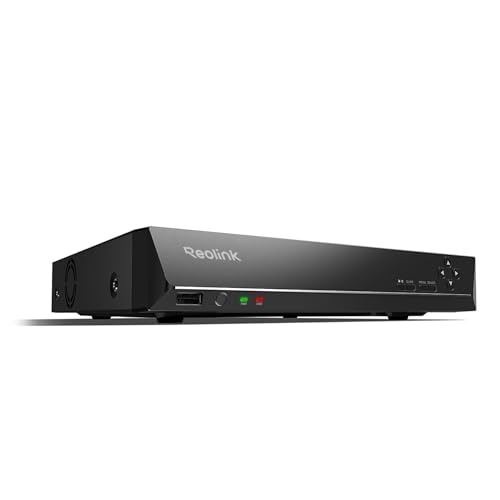
REOLINK RLN8-410 8CH NVR Network Video Recorder PoE
$349.99Eight PoE ports built into the recorder, so the cameras get power and data from the same box and there is no separate switch to budget.
- Channels
- 8
- PoE ports
- 8
Prices change often.
REOLINK RLN16-410 16CH NVR Network Video Recorder PoE
$459.99Sixteen channels for a property that has outgrown eight, and the usual reason to buy one is a detached garage or a second building.
- Channels
- 16
Prices change often.

Seagate Skyhawk 4TB Video Internal Hard Drive
$159.99Rated for continuous write from multiple camera streams, which is the entire difference between a surveillance drive and the cheaper desktop drive beside it.
- Capacity
- 4 TB
Prices change often.

Western Digital 8TB WD Purple Surveillance Internal Hard Drive, 256 MB Cache
$354.99Eight terabytes of surveillance rated storage, the usual pairing with a sixteen channel recorder.
- Capacity
- 8 TB
Prices change often.

APC BE600M1 UPS Battery Backup and Surge Protector
$79.99Enough to carry a recorder, a PoE switch and the router through the short outages that make up most of them, which is when a camera system is most likely to be needed.
- Rating
- 600 VA
Prices change often.

CyberPower EC850LCD Ecologic UPS Battery Backup and Surge Protector
$119.95A display that reports the actual load in watts, which turns a runtime estimate into a measurement.
- Rating
- 850 VA
Prices change often.
Common questions
Should I record continuously or only on motion?
Continuous recording at 24 hours a day guarantees footage of anything that happens, including an event a motion sensor missed or triggered late on, at the cost of far more storage per day. Motion-only recording stretches the same drive across many more days of coverage but depends on the motion detection actually catching the event in the first place.
Can I use a regular desktop hard drive in an NVR instead of a surveillance-rated one?
It will often work initially, but a desktop drive is not rated or warrantied for the continuous 24-hour write workload an NVR produces, which is a different duty cycle than typical desktop use. Surveillance-rated drives such as the Seagate SkyHawk or WD Purple lines are built and firmware-tuned specifically for that workload.
Why does a UPS's runtime not match its VA rating on the box?
The VA rating describes the UPS's maximum instantaneous output capacity, not how long it can sustain a given load. Actual runtime depends on the battery's real watt-hour capacity, the inverter's efficiency converting that stored energy to usable AC power, and the fact that a battery is not discharged all the way to zero, all of which reduce the number below what the VA rating alone would suggest.
What happens when an NVR drive fills up?
Almost all NVRs are configured by default to overwrite the oldest footage once the drive is full, so recording does not stop, but retention silently shrinks below the planned target if the drive was undersized for the actual bitrate and camera count. Checking the calculated retention against the drive size before relying on it avoids finding this out only when older footage is actually needed.
Is a local NVR more private than a cloud camera system?
Generally yes, since footage on a local NVR never leaves the property unless the owner exports it, while a cloud system sends a copy of that footage to a third party's servers as a normal part of how it works. A local NVR does require its own drive, UPS, and physical security, which a cloud system does not.
Get the system planning sheet
The camera count, storage and PoE budget worksheet, plus the wiring checklist, as one printable page.
Keep going
Before you point a camera at anything. Aim cameras at your own property and your own boundary, never into a neighbour's windows or across their garden. Cameras in bedrooms, bathrooms, or anywhere else a person reasonably expects privacy are a serious legal problem, and that includes guests, lodgers and anyone who works in your home. Audio is legally different from video, many US states require the consent of every party to a recorded conversation, and several recorders capture audio by default, so check your own state before you enable it. Some places require visible notice that recording is taking place, and landlords and homeowner associations often impose their own rules on top. This is researched general information and not legal advice, and the law varies by state and by country.
And once it is installed. Change every default password, keep the firmware updated, and be clear with yourself about where the footage goes: a cloud camera means a third party holds recordings of your home, while a local recorder keeps them in your house. That is a genuine buying consideration, not a technicality.
A local NVR is the privacy-preserving choice specifically because footage stays on a drive in the house rather than on a cloud provider's servers; weigh that against the convenience of a cloud plan before committing to either.