Security Camera Upload Bandwidth Chart
Four cameras at 4MP recording continuously in H.265 need about 12 Mbps of sustained upload and around 3,888 GB a month, which is 120 percent of a common 10 Mbps upload connection, meaning that connection cannot sustain it without dropped frames.
Security cameras only ever consume upload bandwidth, since the video travels from the camera to the cloud or to a phone, never the other way. Most residential internet plans are asymmetric on purpose, with far more download than upload, so a connection that feels fast for streaming video can still be far too slow for uploading it.
The figures below assume continuous recording (duty cycle 1.0, meaning the camera uploads all day) at this site's conventional H.265 bitrates. Event-only clips upload for a fraction of the day and use proportionally less; the calculator lets you set your own duty cycle.
| Cameras | 2MP Mbps | 2MP GB/month | 4MP Mbps | 4MP GB/month | 8MP Mbps | 8MP GB/month |
|---|---|---|---|---|---|---|
| 1 | 2 Mbps | 648 GB | 3 Mbps | 972 GB | 6 Mbps | 1,944 GB |
| 2 | 4 Mbps | 1,296 GB | 6 Mbps | 1,944 GB | 12 Mbps | 3,888 GB |
| 4 | 8 Mbps | 2,592 GB | 12 Mbps | 3,888 GB | 24 Mbps | 7,776 GB |
| 8 | 16 Mbps | 5,184 GB | 24 Mbps | 7,776 GB | 48 Mbps | 15,552 GB |
| Upload speed | Load at 12 Mbps required | Load at 16 Mbps required | Load at 24 Mbps required |
|---|---|---|---|
| 1 Mbps | 1,200% | 1,600% | 2,400% |
| 3 Mbps | 400% | 533.3% | 800% |
| 5 Mbps | 240% | 320% | 480% |
| 10 Mbps | 120% | 160% | 240% |
| 20 Mbps | 60% | 80% | 120% |
| 35 Mbps | 34.3% | 45.7% | 68.6% |
| 50 Mbps | 24% | 32% | 48% |
| 100 Mbps | 12% | 16% | 24% |
Why upload speed, not download speed, decides this
A camera sends its stream out, so the number that matters is the upload figure on your plan, not the download figure that internet providers usually advertise first. A connection billed as "500 Mbps" is frequently 500 Mbps download and 10 to 20 Mbps upload, and it is that smaller number the cameras compete over.
What duty cycle means and why it changes everything
Duty cycle is the fraction of the day a camera is actually uploading. Continuous cloud recording runs at duty cycle 1.0, all day. Event-only or motion-triggered cloud clips might run at a duty cycle of 0.05 to 0.15, since the camera only uploads short bursts when triggered. The same camera can therefore need either 6 Mbps or well under 1 Mbps depending entirely on whether it streams continuously or in short triggered clips.
When the math says to record locally instead
Once required upload approaches or passes an uplink's full capacity, cloud recording is not a viable primary option regardless of subscription price, since the video will not arrive intact. A local PoE camera writing straight to an NVR or an SD card uses no internet bandwidth at all for recording, only for remote viewing, which is a fraction of the load.
The gear that matches this answer

eufy Security SoloCam S340, 3K Dual-Lens Solar Security Camera
$159.99Solar charged with local storage on the camera, so it needs neither a cable nor a subscription, which is the only wireless configuration this site recommends without reservation.
- Power
- Solar and battery
- Storage
- On camera
Prices change often.

eufy Security SoloCam S220, Solar Security Camera, Wireless Outdoor
$69.99The cheapest solar camera here that stores locally rather than requiring a plan to keep anything.
- Power
- Solar and battery
- Storage
- On camera
Prices change often.

Blink Outdoor 4 Wireless Smart Security Camera, 1080p
$129.99The cheapest name brand wireless camera, and an honest demonstration of the trade: 1080p puts roughly a third of the pixels on the scene that a 4K PoE camera does.
- Resolution
- 2 MP
- Power
- Battery
Check first:Full functionality expects a subscription, and 1080p will not reach DORI identify distance at any useful range.
Check price on AmazonPrices change often.

Ring Outdoor Cam, Stick Up Cam, Weather-Resistant HD Security Camera
$79.99Widely supported and simple to place, and the clearest example on this site of a camera where a third party holds the recordings of your home by default.
- Power
- Battery
Check first:Recording history requires a subscription, and footage is held by the vendor rather than by you.
Check price on AmazonPrices change often.
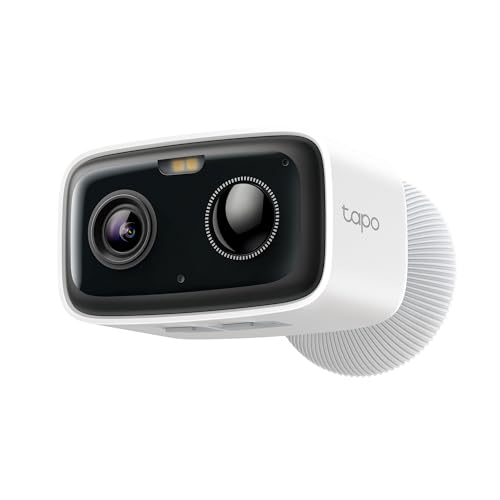
Tapo 1080p Outdoor Wireless Security Camera, Up to 180-Day Battery, C400
$44.99A very long battery life and local microSD storage, so it can run without a subscription.
- Resolution
- 2 MP
- Power
- Battery
- Storage
- microSD
Prices change often.
Common questions
What upload speed do I need for cloud security cameras?
It depends on camera count, resolution, and duty cycle. As a reference point, four 4MP cameras recording continuously in H.265 need about 12 Mbps sustained. Event-only cloud clips need far less because the duty cycle is much lower. Check your plan's upload speed specifically, since it is usually far lower than the advertised download speed.
What does duty cycle mean in this chart?
Duty cycle is the fraction of each day a camera is actively uploading video. A value of 1.0 means continuous, all-day upload. A motion-triggered camera that only clips for a few short events a day might have a duty cycle closer to 0.05 to 0.1, which cuts required bandwidth by 90 percent or more compared with continuous streaming.
Does my download speed matter for security cameras?
Not for recording. Cameras send video out, which uses upload bandwidth. Download speed only matters when you are pulling footage back down to view it, such as scrubbing through cloud history on a phone, and that load is far smaller and short-lived compared with continuous camera upload traffic.
Why do 4K cameras strain a connection so much more than 1080p ones?
At this site's H.265 assumptions, an 8MP (4K) camera runs about three times the bitrate of a 2MP (1080p) camera. Eight 4K cameras therefore need roughly three times the upload and three times the monthly data of eight 1080p cameras, which is why a 4K upgrade across a whole system can turn a workable connection into an overloaded one.
What does it mean if my load percentage is over 100 percent?
It means the required upload for that camera load alone exceeds your entire upload connection, which is not physically sustainable. In practice this shows up as dropped frames, failed uploads, or cameras going offline under load. The fix is a faster upload plan, a lower duty cycle or resolution, or moving that recording load to a local NVR instead of the cloud.
Get the system planning sheet
The camera count, storage and PoE budget worksheet, plus the wiring checklist, as one printable page.
Keep going
Before you point a camera at anything. Aim cameras at your own property and your own boundary, never into a neighbour's windows or across their garden. Cameras in bedrooms, bathrooms, or anywhere else a person reasonably expects privacy are a serious legal problem, and that includes guests, lodgers and anyone who works in your home. Audio is legally different from video, many US states require the consent of every party to a recorded conversation, and several recorders capture audio by default, so check your own state before you enable it. Some places require visible notice that recording is taking place, and landlords and homeowner associations often impose their own rules on top. This is researched general information and not legal advice, and the law varies by state and by country.
And once it is installed. Change every default password, keep the firmware updated, and be clear with yourself about where the footage goes: a cloud camera means a third party holds recordings of your home, while a local recorder keeps them in your house. That is a genuine buying consideration, not a technicality.